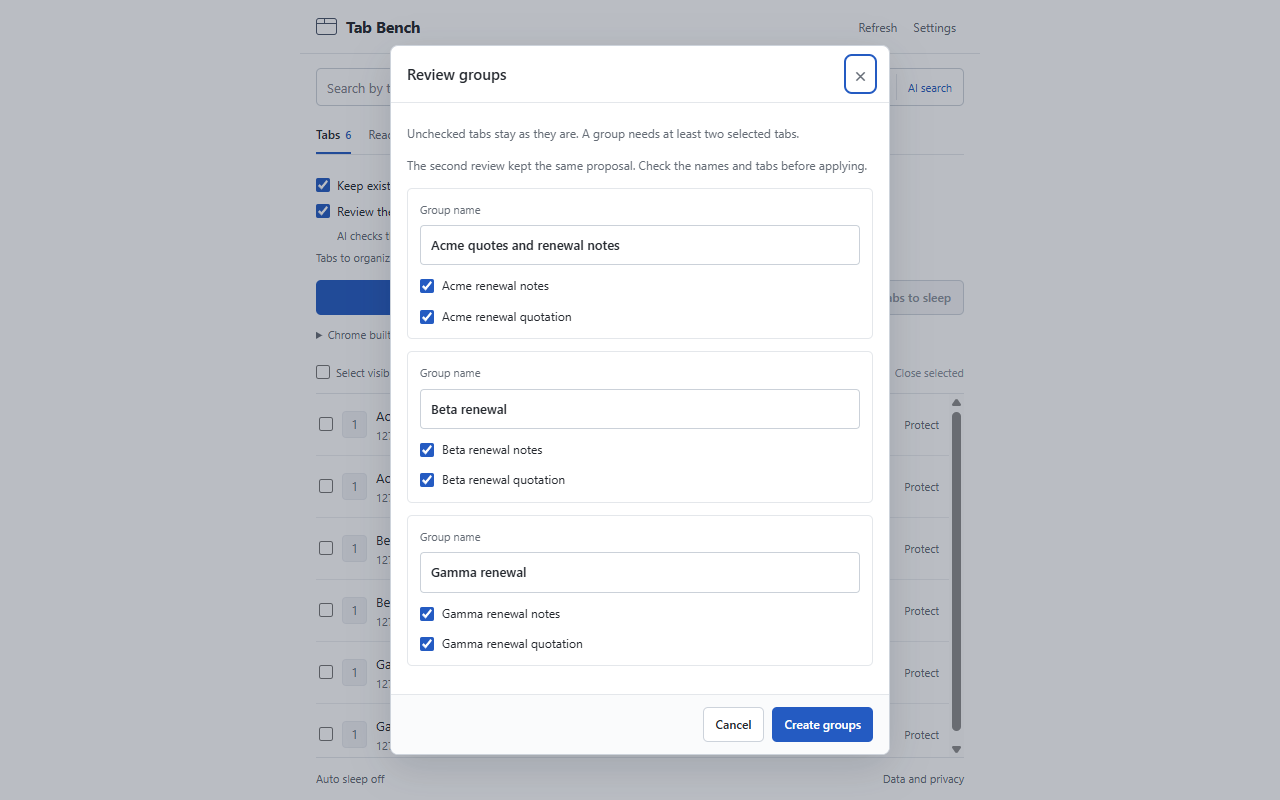
Check the groups
Review the proposed names and tabs before applying. Rename a group or uncheck tabs you want to leave as they are. Keep existing groups when you organize again.
A Chrome extension by uniale
Tab Bench uses Chrome’s built-in AI to suggest groups for your open tabs. Change a group name, leave a tab out, then apply the suggestion when it looks right.
Chrome内蔵AIが、開いているタブのグループ分けを提案します。グループ名と対象のタブを確認してから反映できます。
Chrome Web Store release in preparation.
Chrome ウェブストアでの公開を準備しています。
How it works
Review the proposed names and tabs before applying. Rename a group or uncheck tabs you want to leave as they are. Keep existing groups when you organize again.
Turn on the optional second review to check the first suggestion for mixed topics, related tabs it missed and unclear names. It takes longer. If the suggestion changes, you can compare both versions before deciding.
Put idle tabs to sleep to release memory, or select tabs to close and check the list first. Sleeping tabs stay open and reload when you return. Save unfinished work before either action.
日本語
Tab Benchは、開いているタブのタイトルやURLをもとに、Chrome内蔵AIでグループ分けを提案する拡張機能です。整理案をそのまま反映することも、グループ名を書き換えたり、対象からタブを外したりすることもできます。次に整理するときは、既存のグループを残せます。
「整理案をもう一度見直す」を選ぶと、最初の案をもとに、話題の混在・まとめ漏れ・名前のわかりにくさをAIが確認します。時間はかかりますが、変更があれば最初の案と見直した案を比べて選べます。
使っていないタブは、閉じずに休止させてメモリを解放できます。不要なタブを選び、一覧を確認してから閉じる操作もできます。休止したページは、戻ったときに再読み込みされます。入力・編集した内容を自動保存する機能はないため、休止や閉じる操作の前に保存してください。
Privacy
Tab Bench does not send tab information to the operator or an external AI service. It has no cloud AI fallback and no analytics. It reads tab information, not page bodies or form contents.
Chrome may download or update its AI model. Availability depends on your device and browser settings. Website connections and Chrome’s own tab and group sync are separate. Turn off tab and tab-group sync in Chrome before grouping.
Tab activity and protection settings are kept for the current Chrome session. After a restart or extension reload, protection needs to be set again and automatic sleep returns to off.
Read the privacy policyタブ情報を運営者や外部のAIサービスへ送る機能はありません。クラウドAIへの切り替えやアクセス解析も行いません。参照するのはタブの情報で、ページ本文やフォームの内容は読み取りません。
ChromeによるAIモデルのダウンロード・更新は別途発生します。対応状況は端末やブラウザの設定によって異なります。Webサイトへの通信やChromeのタブ・グループ同期も別の仕組みです。グループ分けの前に、Chromeのタブとタブグループの同期をオフにしてください。
タブの利用記録や保護設定は、Chromeの起動中に保持します。Chromeの再起動や拡張機能の再読み込みなどで保護設定は消え、自動休止はオフに戻ります。
プライバシーポリシーを読むContact / お問い合わせ
Individual publisher / 個人運営